Title
Description of package

Description of package

Calendly is a scheduling software designed to streamline the process of setting up meetings and appointments. By integrating seamlessly with users’ calendars and providing a user-friendly interface, Calendly allows individuals and businesses to automate the scheduling process, eliminating the back-and-forth emails traditionally required to find a suitable time. Users can share their availability through a personalized link, enabling others to book a time slot that works for both parties. This tool supports various types of meetings, from one-on-one sessions to group events, and includes features such as automated reminders, customizable meeting types, and integration with other tools like Zoom and Google Meet.
For small and medium teams, scheduling software like ‘Calendly’ is particularly valuable as it enhances productivity and efficiency. By automating the appointment-setting process, you can save significant time and reduce the likelihood of scheduling conflicts. This is crucial for smaller teams where every member’s time is highly valuable and resources are limited. Additionally, such tools help maintain a professional and organized appearance, fostering better relationships with third parties and internal coordination. This approach allows you to focus more on their core activities and strategic goals, rather than administrative tasks, making collaboration between team members even better.
Using proprietary software like Calendly might seem like an easy choice, but it has several downsides that make open source alternatives worth considering. Relying on proprietary software often results in vendor lock-in, meaning you’re stuck with one provider and limited in your ability to switch if something better comes along. In addition, once you are locked in their pricing usually changes imposing you to continue using their services. On the other hand, open source options give you more control and flexibility. You can customize the software to fit your exact needs if you have the resources, and you’re part of a community that constantly improves the tool. This collaborative approach not only leads to better features and security but also ensures you’re not dependent on a single company for updates or support.
There are excellent open source alternatives to Calendly that provide robust scheduling capabilities without the drawbacks of proprietary software. One such option is ‘Easy!Appointments,’ known for its simple interface and powerful features, including Google Calendar synchronization and email notifications. Another strong contender is ‘Cal.com,’ a modern open source scheduling tool that emphasizes flexibility and user experience, allowing users to easily adapt the software to their specific needs. Both of these tools eliminate subscription costs and benefit from a collaborative development environment, ensuring continuous improvements and security enhancements. By choosing an open source scheduling tool like Easy!Appointments or Cal.com, teams can enjoy greater control, customization, and community-driven support, making these alternatives compelling options for managing appointments and meetings.
We really like some of the open source alternative out there, but as a team that specializes in managed hosting for open source software like Nextcloud, we prefer using the ‘Nextcloud Appointments app’ for our scheduling needs. This app seamlessly integrates with our Nextcloud installation, offering our team members a straightforward way to manage appointments directly from our instance. Key features of the software include, but are not limited to:
Additionally, it supports various booking rules and time slots, making it easy to tailor the scheduling process to fit your specific requirements. By using the Nextcloud Appointments App, we ensure that our scheduling stays within our secure, self-hosted environment, providing us both convenience and enhanced privacy. Nextcloud Appointments app is developed by ‘Sergey Mosin’.
Installing the Nextcloud Appointment app is a straightforward process that can be done directly from the Nextcloud app store. Here are the steps:
Here is how the app panel looks from the dashboard. You can easily add and/or remove appointment slots based on your availability.
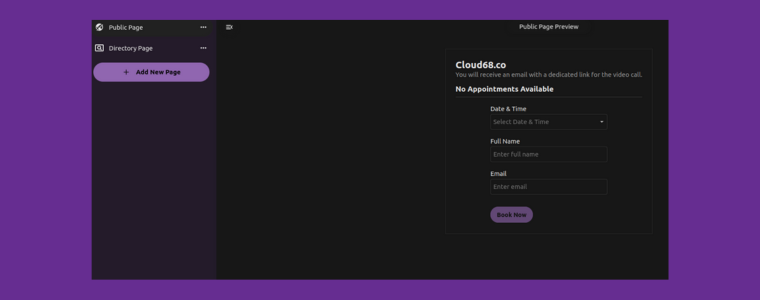
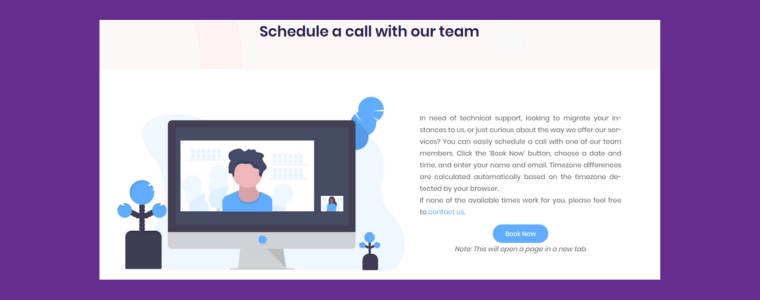
With the Appointments app installed, you can start managing your schedule and appointments seamlessly within your Nextcloud instance. Here is how Nextcloud Appointments app is integrated with our website where we handle requests from folks that use our service, or are interested in getting managed hosting service from us or jusst have questions.
Interested in having the Nextcloud Appointments app? You need to have a Nextcloud instance first. There are two primary ways to get started with Nextcloud initially and Nextcloud Appointment app later: self-hosting or opting for managed hosting services.
1. Self-hosting can be a rewarding project, giving you complete control over your cloud storage and collaboration tools. Fortunately, there are plenty of resources available online to guide you through the process, from setting up your server to configuring Nextcloud to suit your needs. Websites like ‘Reddit’s r/selfhosted’ and the ‘Nextcloud community forum’ offer invaluable support and step-by-step guides to help you get started.
2. If managing your own server sounds complex or if you simply prefer a hands-off approach, Nextcloud managed hosting services are an excellent alternative. With a managed hosting provider, like ourselves, you can enjoy the benefits of Nextcloud and of Nextcloud Appointment app without the hassle of software deployment, server maintenance, automated backups and troubleshooting. Teams like ours even take care of the installation of the app in some cases to make it easier for you to use such open source tools, allowing you to focus on what matters most: your work and collaboration.
Whether you choose to self-host or opt for managed hosting, Nextcloud apps empowers your team to limit the dependency from big tech 💪. This is important nowadays more than ever in an environment increasingly dominated by centralized cloud services empowered by big tech services.

Posts from our team.